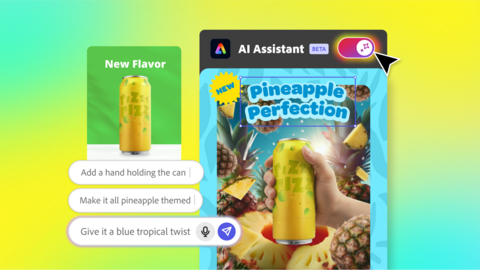
Adobe Express Just Got an AI Assistant That’ll Actually Do Your Design Work

Adobe is betting hard on AI, and the company’s latest move with Adobe Express might actually be one of the more useful implementations of the technology I’ve seen lately. They’ve rolled out an AI Assistant in beta that literally lets you boss around your designs with natural language prompts. Yes, you read that right—you can now tell your design software what to do like you’re texting a very talented intern.

This isn’t some gimmick feature buried in a submenu somewhere. Adobe Express’s AI Assistant is a conversational interface that sits right there in your workflow, and it’s designed to handle the kind of editing tasks that would normally require you to click through menus, adjust sliders, and generally remember where Adobe hid that one feature you need. Instead, you just… ask. Want to change the color scheme? Ask. Need to resize something? Ask. Want to add elements or rearrange your layout? You guessed it—ask.

Read more

Microsoft Plans to Turn Every Windows 11 Device into an AI-Powered Voice Assistant

Microsoft is set to introduce a new feature that allows users to operate their computers and laptops through voice commands. To make this possible, the company plans to make every Windows 11 device powered by artificial intelligence (AI). These AI PCs will be operated through Microsoft’s Copilot chatbot, enabling users to control their computers and perform various tasks simply by speaking.

Yusuf Mehdi, Microsoft’s Executive Vice President and Chief Consumer Marketing Officer, said, “We’re on the brink of a major transformation where artificial intelligence will go beyond being just a chatbot — it will become part of every daily computing experience. Our goal is to rebuild the operating system so that computers and laptops truly become AI PCs.”Read more

How to Create a Website with AI

Let’s be real , most people don’t actually want to learn how to code. They just want a website that looks good, works on phones, and doesn’t break when they upload a picture that’s 10MB too big. That’s where AI tools step in. Forget hours of Googling CSS tutorials; you can now spin up a fully functioning website faster than it takes to decide on a domain name.

Here’s how to actually do it – no buzzwords, no fluff.


Step 1: Start with the Right Builder

A bunch of site builders are slapping “AI” on everything right now. Ignore the hype and focus on what matters: ease of use and decent design.Read more

DigitalOcean Plans and Pricing: A Simple Guide for 2025

Alright, folks, buckle up. We’re about to dive into the murky waters of DigitalOcean’s plans and pricing for 2024, and let me tell you, it’s about as straightforward as assembling IKEA furniture after a three-martini lunch.

First off, let’s address the elephant in the room: DigitalOcean. It’s the cool kid’s table of cloud hosting, where developers go to feel like they’re part of some exclusive club that knows what “kubectl” means. But here’s the kicker – they’re actually trying to make this stuff accessible. I know, shocking.

Now, let’s break down these plans, shall we? Brace yourselves for a journey through the land of Droplets, Kubernetes, and other terms that sound like they belong in a sci-fi novel.

Droplets: DigitalOcean’s Fancy Name for VMs

Droplets are basically virtual machines, but “Droplet” sounds cuter, doesn’t it? It’s like they’re trying to make server management sound as harmless as a raindrop. Spoiler alert: it’s not.

Basic Droplets: Starting at $4/month. Perfect for your blog about artisanal toast that gets three visitors a month.
General Purpose Droplets: From $75/month. For when your toast blog unexpectedly goes viral.
CPU-Optimized Droplets: Beginning at $42/month. Because apparently, some people need to calculate pi to the millionth digit.
Memory-Optimized Droplets: Kicking off at $90/month. For those who think RAM is something you can never have too much of, like cats or streaming subscriptions.

Read more